Token
The editor you'll actually enjoy.
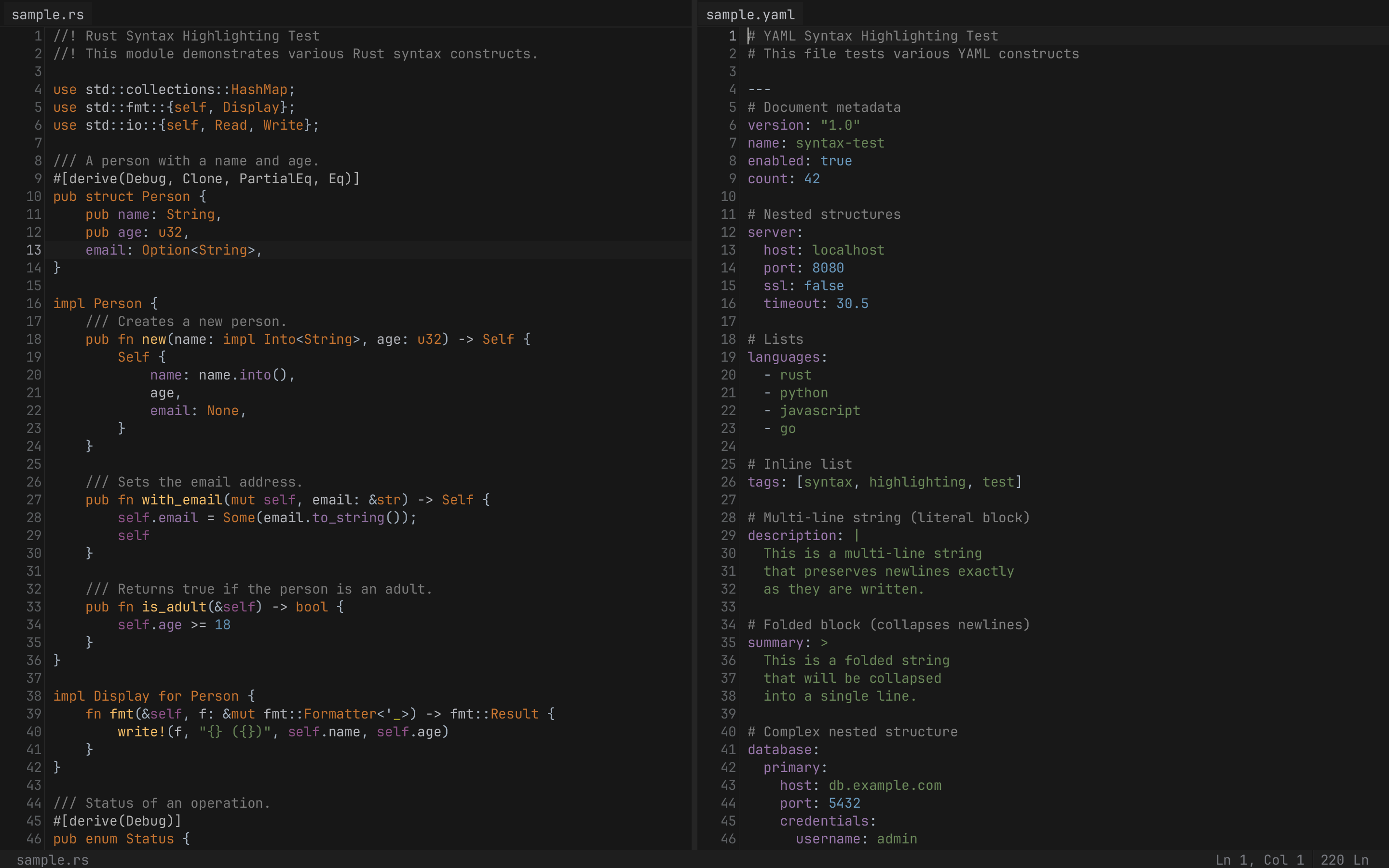
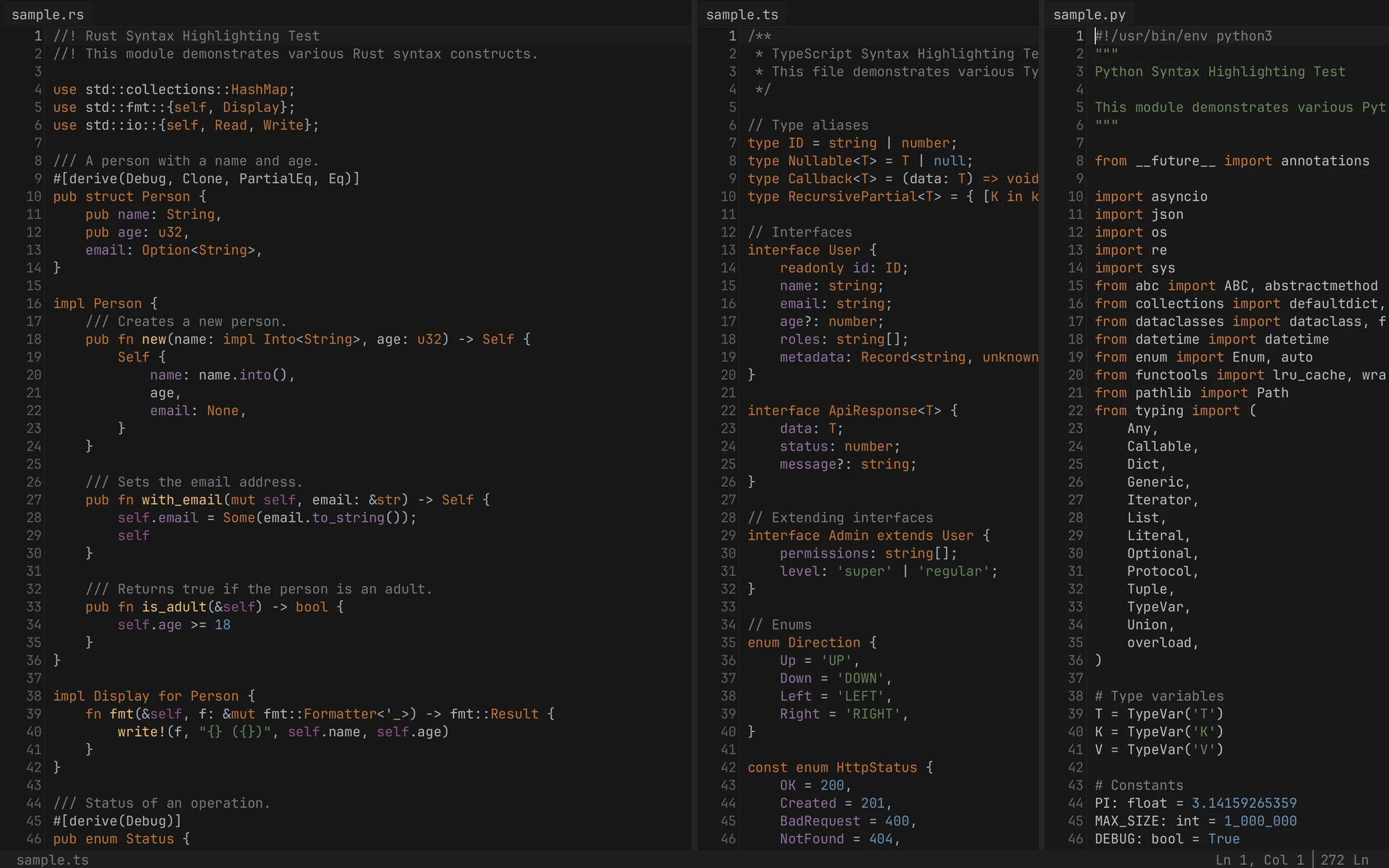
A fast, minimal text editor with multi-cursor support, split views, and syntax highlighting for 20 languages. Built in Rust.
Features
Everything you need, nothing you don't.
Multi-Cursor Editing
Add cursors with Cmd+Click or Option+Option+Arrow. Edit multiple locations simultaneously.
Split Views
Horizontal and vertical splits with independent viewports. View the same file side-by-side.
Syntax Highlighting
Tree-sitter based highlighting for 20 languages with incremental parsing.
CSV Viewer
Spreadsheet-style view for CSV, TSV, and PSV files with cell editing and navigation.
Configurable Keys
YAML-based keymap with context-aware bindings. 74 default bindings included.
Themes
Dark and light themes with full customization. Create your own in YAML.
Installation
Pre-built Binaries
Download the latest release for your platform:
curl -LO https://github.com/HelgeSverre/token/releases/latest/download/token-darwin-arm64.tar.gz
tar -xzf token-darwin-arm64.tar.gz
chmod +x token
sudo mv token /usr/local/bin/
curl -LO https://github.com/HelgeSverre/token/releases/latest/download/token-darwin-amd64.tar.gz
tar -xzf token-darwin-amd64.tar.gz
chmod +x token
sudo mv token /usr/local/bin/
curl -LO https://github.com/HelgeSverre/token/releases/latest/download/token-linux-amd64.tar.gz
tar -xzf token-linux-amd64.tar.gz
chmod +x token
sudo mv token /usr/local/bin/
# Download from GitHub Releases
# https://github.com/HelgeSverre/token/releases
# Or using PowerShell:
Invoke-WebRequest -Uri https://github.com/HelgeSverre/token/releases/latest/download/token-windows-amd64.zip -OutFile token.zip
Expand-Archive token.zip -DestinationPath $HOME\token -Force
Build from Source
Requires Rust toolchain (1.75+):
git clone https://github.com/HelgeSverre/token
cd token
make setup # Install dev dependencies
make release # Build optimized binary
make run # Run the editor
Quick Start
Get up and running in seconds.
Open a file
token path/to/file.rs
Open a folder (workspace)
token .
Essential shortcuts
| Action | macOS | Windows/Linux |
|---|---|---|
| Save | Cmd+S | Ctrl+S |
| Open file | Cmd+O | Ctrl+O |
| Command palette | Cmd+Shift+A | Ctrl+Shift+A |
| Go to line | Cmd+L | Ctrl+L |
| Toggle sidebar | Cmd+1 | Ctrl+1 |
Keyboard Shortcuts
All shortcuts shown for macOS. Use Ctrl instead of Cmd on Windows/Linux.
| Action | Shortcut |
|---|---|
| Undo | Cmd+Z |
| Redo | Cmd+Shift+Z |
| Copy | Cmd+C |
| Cut | Cmd+X |
| Paste | Cmd+V |
| Duplicate line/selection | Cmd+D |
| Delete line | Cmd+Backspace |
| Delete word backward | Option+Backspace |
| Delete word forward | Option+Delete |
| Indent | Tab (with selection) |
| Unindent | Shift+Tab |
| Action | Shortcut |
|---|---|
| Extend selection | Shift + any movement key |
| Select all | Cmd+A |
| Select word | Double-click |
| Select line | Triple-click |
| Expand selection | Option+Up |
| Shrink selection | Option+Down |
| Select next occurrence | Cmd+J |
| Unselect occurrence | Cmd+Shift+J |
| Action | Shortcut |
|---|---|
| Add/remove cursor | Cmd+Click |
| Add cursor above | Option+Option+Up |
| Add cursor below | Option+Option+Down |
| Rectangle select | Middle mouse drag |
| Collapse to single cursor | Escape |
Tip: Double-tap Option quickly, then press Up/Down to add cursors. The gesture must complete within 300ms.
| Action | Shortcut |
|---|---|
| Split horizontal | Cmd+Shift+Option+H |
| Split vertical | Cmd+Shift+Option+V |
| Next tab | Cmd+Option+Right |
| Previous tab | Cmd+Option+Left |
| Focus next group | Ctrl+Tab |
| Focus previous group | Ctrl+Shift+Tab |
| Focus group 1-4 | Cmd+Shift+1-4 |
| Toggle sidebar | Cmd+1 |
| Action | Shortcut |
|---|---|
| Save | Cmd+S |
| Save as | Cmd+Shift+S |
| Open file | Cmd+O |
| Open folder | Cmd+Shift+O |
| New tab | Cmd+Shift+N |
| Close tab | Cmd+W |
| Command palette | Cmd+Shift+A |
| Find/Replace | Cmd+F |
| Reveal in sidebar | Cmd+Shift+R |
Customizing Keybindings
Create ~/.config/token-editor/keymap.yaml to override defaults:
# Custom keybindings
- key: cmd+shift+d
command: DuplicateLine
# Disable a default binding
- key: cmd+d
command: Unbound
# Context-aware bindings
- key: tab
command: Indent
when: [has_selection]
- key: tab
command: InsertTab
when: [no_selection]
Available contexts: has_selection, no_selection, has_multiple_cursors, modal_active
Themes
Four built-in themes. Full customization via YAML.
fn main() {
let msg = "Hello";
// Token editor
}
Default Dark
VS Code inspired dark theme (default)
fn main() {
let msg = "Hello";
// Token editor
}
Fleet Dark
JetBrains Fleet inspired
fn main() {
let msg = "Hello";
// Token editor
}
GitHub Dark
GitHub's dark theme
fn main() {
let msg = "Hello";
// Token editor
}
GitHub Light
GitHub's light theme
Setting Your Theme
Edit ~/.config/token-editor/config.yaml:
theme: github-dark
Creating Custom Themes
Create a theme file in ~/.config/token-editor/themes/my-theme.yaml:
version: 1
name: "My Custom Theme"
author: "Your Name"
description: "A custom theme"
ui:
editor:
background: "#1E1E1E"
foreground: "#D4D4D4"
current_line_background: "#2A2A2A"
cursor_color: "#FCE146"
selection_background: "#264F78"
gutter:
background: "#1E1E1E"
foreground: "#666666"
foreground_active: "#CCCCCC"
status_bar:
background: "#007ACC"
foreground: "#FFFFFF"
syntax:
keyword: "#C586C0"
function: "#DCDCAA"
string: "#CE9178"
comment: "#6A9955"
type: "#4EC9B0"
number: "#B5CEA8"
Then set theme: my-theme in your config.
Supported Languages
Syntax highlighting powered by Tree-sitter with incremental parsing.
- Rust
- TypeScript / TSX
- JavaScript
- Python
- Go
- Java
- C / C++
- PHP
- Bash
- Scheme
- HTML
- CSS
- JSON
- YAML
- TOML
- Markdown
- XML / Plist / SVG
- INI / Config
CSV Viewer
Token includes a spreadsheet-style viewer for CSV, TSV, and PSV files.
Opening CSV files
Open any CSV file normally, then use the Command Palette (Cmd+Shift+A) and select "Toggle CSV View".
CSV Navigation
| Action | Shortcut |
|---|---|
| Move between cells | Arrow Keys |
| Next cell | Tab |
| Previous cell | Shift+Tab |
| Edit cell | Enter or start typing |
| Confirm edit | Enter |
| Cancel edit | Escape |
| Page navigation | PageUp/PageDown |
| First/last cell | Cmd+Home/End |
FAQ
Where are config files stored?
Configuration files are stored in:
- macOS/Linux:
~/.config/token-editor/ - Windows:
%APPDATA%\token-editor\
Key files:
config.yaml- Theme selection and settingskeymap.yaml- Custom keybindingsthemes/- Custom theme files
How do I add a language?
Token uses Tree-sitter for syntax highlighting. Adding a new language requires:
- Adding the Tree-sitter grammar as a dependency
- Creating a highlights.scm query file
- Registering the language in the syntax module
See docs/feature/adding-languages.md for details.
Why is it called Token?
Token refers to the fundamental unit of text in parsing and editing. It's also a nod to the project being built largely through AI-assisted development using Amp Code.
How does multi-cursor work?
All cursors move and edit simultaneously. Key behaviors:
- Overlapping cursors merge automatically
- Each cursor maintains independent selection
- Undo/redo applies to all cursors as a single operation
- Press Escape to collapse to single cursor
Is Token open source?
Yes! Token is MIT licensed. View the source on GitHub.